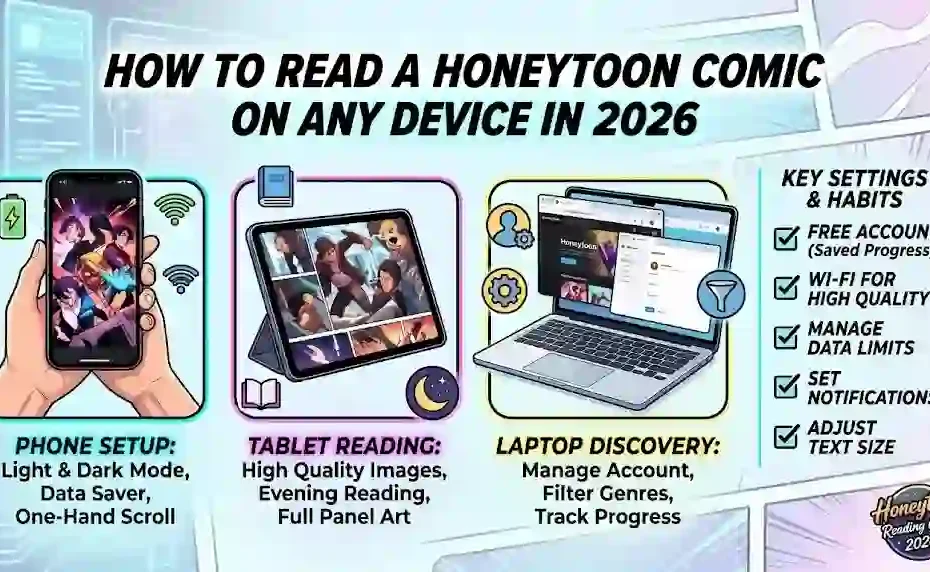
You open a chapter on your phone, the page jumps, the art loads in blurry chunks, and your battery dies at the reveal. A few settings would have prevented all three. This walkthrough shows how to set up a Honeytoon comic for phone, tablet, and laptop reading, which options to change first, and which habits keep a long series comfortable.
What You Need Before You Open Your First Honeytoon Comic
Setup takes about five minutes. Gather these first so you are not solving problems mid-chapter.
- A stable connection, ideally Wi-Fi for your first session.
- A free account, because saved progress lives on your profile, not your device.
- One series picked in advance, so browsing does not replace reading.
- A charger nearby, since long vertical art drains batteries faster than text.
Skip the account and you will lose your place the moment you clear your browser. That single step saves real frustration later.
Step by Step: Setting Up a Reader Profile That Works
Follow this order and your first session runs clean.
- Create the account and confirm the email address.
- Set your content preferences, including whether mature titles stay visible.
- Open the reader settings and set text and image size once.
- Follow two series, no more, for the first week.
- Add the site to your home screen or install the app for faster access.
- Turn on update notifications for the titles you followed.
Two series feels too modest. It is deliberate, because a Honeytoon comic binge works better when you return to the same story instead of juggling six opening chapters.
Phone, Tablet, or Laptop: Choosing Your Main Screen
Each screen changes the reading experience more than most readers expect. The table below matches screens to habits.
| Screen | Strengths | Weaknesses | Best Reading Habit |
| Phone | One-hand scrolling, always with you | Small panels, faster battery drain | Short sessions on commutes and queues |
| Tablet | Full-page art detail, relaxed viewing distance | Heavier, awkward while standing | Evening reading at home |
| Laptop | Large canvas, easy multi-tab browsing | Poor comfort for long scrolls | Discovery and list building |
| E-reader | Gentle on the eyes for text | Color art suffers badly | Not recommended for comics |
Most readers settle on phone as the daily device and tablet as the weekend upgrade. Test both before buying anything, because a Honeytoon comic in color loses a lot on a monochrome screen.
Reader Settings Worth Changing on Day One
Six settings do most of the work. Change them once and every chapter benefits.
- Image quality: high on Wi-Fi, standard on mobile data.
- Background mode: dark or warm for evening reading, light for daylight.
- Scroll mode: continuous for long strips, tap-to-advance if your thumb gets tired.
- Image fit: full width, so panels are never cropped at the edges.
- Auto-lock timeout: longer, so the screen does not dim mid-chapter.
- Data saver: on when you travel, off at home.
Screenshot your settings before you change five of them at once. When something feels wrong later, you can restore the original state in seconds.
How to Find a Series Without Wasting an Evening
Discovery is where new readers lose hours. Three filters cut that down.
Start with genre, then narrow by status. Completed series suit readers who want a full arc, while ongoing titles suit readers who enjoy weekly anticipation. Finally, sort by rating and episode count, and read the first two chapters before you commit.
Ignore cover art as your main signal. A stunning thumbnail on a series page says nothing about pacing, and some of the strongest titles use quiet, plain artwork.
Managing Data, Storage, and Battery on Long Reads
Vertical comics are image-heavy, and images are bigger than text. A hundred chapters can occupy more space than a photo library.
Keep an eye on three numbers: monthly data use, free device storage, and battery percentage at the start of a session. Download chapters only for trips without Wi-Fi, and delete finished downloads weekly.
Battery habits matter too. Lower brightness, disable background refresh for other apps, and avoid charging while reading in bed. Heat plus a long session shortens battery life over a year, and that cost lands on you, not the platform.
Keeping Your Account and Payments Safe
Comic platforms attract payment fraud because small repeat charges slip past notice. Guard the account the way you guard email.
Use a unique password and a password manager. Turn on two-factor authentication if the platform offers it. Review your subscription or coin history once a month, and screenshot any unusual charge before contacting support.
Watch for lookalike domains. Official pages carry clear company information, working terms of service, and a support address. A Honeytoon comic sites that asks for card details on a page with no company name is a red flag, not a deal.
Accessibility: Reading Comfort for Weak Eyesight and Busy Hands
A good webtoon session should not require perfect eyes or steady hands. Several adjustments help.
Increase text size where the reader supports it, and use system-level zoom elsewhere. On phones, enable one-handed mode so you can scroll without stretching. Screen readers handle dialogue in some apps but fail on art, so audio descriptions rarely exist for comics.
The W3C Web Content Accessibility Guidelines set the baseline for readable contrast and resizable text. If a site ignores those basics, the fault sits with the platform, and switching to a better-reading app is a fair response.
How to Read a Honeytoon Comic Faster Without Skimming
Speed comes from rhythm, not from rushing. Readers who skim lose track of side characters and then quit the series.
Read one arc per sitting rather than half of five arcs. Pause at scene breaks instead of mid-panel. When a chapter ends on a cliffhanger, write one line about what you expect, then move on. That tiny prediction habit keeps the plot sticky.
Set a timer for long sessions. Forty minutes of focused reading beats two distracted hours, and your retention of the story proves it.
Tracking Progress Across Devices
Logged-in reading is the whole point of an account. Progress syncs when you stay signed in on each device.
A few habits keep that sync reliable. Finish a chapter before switching devices, avoid reading the same series signed in and signed out, and refresh the library page when a device shows an older bookmark. If progress stalls twice in a week, log out fully, log back in, and check the library before blaming the app.
Keep a manual backup too. A short note listing the series and chapter you reached costs nothing and rescues you from any sync failure.
Signs You Have Outgrown Your Setup
Free chapters and single-device reading suit casual readers. Regular readers hit limits quickly.
You have outgrown the free tier when you unlock more than a handful of chapters a month, when you read on three devices, or when you follow more than five ongoing series. At that point a flat plan usually costs less than repeated unlocks.
Judge by your own history, not by marketing. Two weeks of tracking shows the truth, and a Honeytoon comic habit is cheaper to manage once you know your real numbers.
Frequently Asked Questions
Do I need an app to read a Honeytoon comic?
No. You can read a Honeytoon comic in a mobile or desktop browser. Installing the app mainly helps with notifications, faster loading, and home-screen access.
Which device is best for reading a Honeytoon comic?
A phone suits daily short sessions, while a tablet gives you larger art and better comfort at home. Try both free for a week before you buy hardware for reading alone.
Why does a Honeytoon comic load slowly on mobile data?
Long vertical images are heavy, and weak signal forces repeated retries. Lower image quality in reader settings, preload chapters on Wi-Fi, and avoid starting a new chapter in a dead zone.
Can I save my place in a Honeytoon comic across devices?
Yes, when you stay signed in to the same account on every device. Finish the chapter before switching, then refresh the library if a bookmark looks out of date.
Is a Honeytoon comic safe to read on public Wi-Fi?
Use a trusted network or a VPN, avoid entering payment details on shared Wi-Fi, and log out on shared computers. Those three habits cover most real risk.
How much data does a Honeytoon comic use per chapter?
Usage depends on image quality and chapter length, so check your device’s data counter for one chapter. Enable data saver for regular reading and keep high quality for Wi-Fi sessions.
Open One Chapter, Then Fix One Setting
Perfect setup is not the goal. A working habit is. Open a single Honeytoon comic tonight, read two chapters, and change exactly one setting before you close the tab.
Tomorrow, change one more. Within a week you will have a reading setup that fits your screen, your data plan, and your schedule. Then share your setup with a friend who is still hunting for chapters in five different apps. Practical help beats a lecture every time.